The Workday Project Roadmap:
What to Expect From Planning
Through Go-Live
A Workday deployment has a lot of moving parts. Teams are making decisions about processes, data, integrations, reporting, security, testing, training, change management, and more, often at the same time. That can make it difficult to know whether the project is actually progressing the way it should.
While every deployment is different, successful projects move through a clear progression. Each phase has its own purpose, priorities, and outcomes. Understanding what should be happening at each stage can help leaders identify gaps earlier, ask better questions, and avoid carrying unresolved issues into the next phase.
This roadmap walks through four major phases of a Workday deployment:
- Planning
- Architect & Configure
- Testing
- Deploy
More importantly, it looks at what leaders should be watching for along the way.
Phase 1: Planning
Build the foundation before you start building the system.
Planning is where the strategic, operational, and organizational foundation for the deployment is established. It’s not just when the project team builds a schedule. This is the time to confirm what is being implemented, establish how decisions will be made, determine whether the right resources are available, identify major dependencies, and begin preparing both the organization and the technology for the work ahead. Strong planning gives the project a shared direction before detailed design and configuration begin.
What should be happening during Planning?
Align leadership, scope, and governance
The project should have a clear vision, defined scope, agreed upon priorities, and measurable outcomes. Leaders should also establish how decisions will be made and escalated. When governance is unclear early in a project, even relatively small decisions can become major delays later.
Understand your resource needs
Workday deployments require meaningful participation from internal teams. Planning should identify who is needed, when they are needed, how much capacity they have, and where additional support may be necessary. This is also the time to account for operational calendars, peak business cycles, planned time off, and other commitments that could affect availability.
Start the technical groundwork
Data, integrations, reporting, and environments should not be treated as future problems. During Planning, teams should begin cataloging integrations, identifying reporting requirements, developing the data conversion approach, and defining how environments will be managed throughout the deployment.
Decommissioning should also be considered as a parallel workstream during Planning. Fully retiring legacy systems is often missed as part of the program scope, even when anticipated savings from those systems were included in the original investment calculation. Without a clear decommissioning strategy, organizations can leave expected savings on the table.
Prepare for testing early
Testing may happen later in the project, but the strategy for testing should begin much earlier. Teams should start defining how testing will be approached, who will participate, what types of scenarios will need to be validated, and how success will be measured.
Testing logistics should also be planned early. The practical details of how testing will be organized and supported are easy to overlook, and they can create unnecessary problems later if they are not addressed up front.
Establish the change and readiness approach
A technically successful deployment can still struggle if the organization is not prepared to adopt it. Stakeholder groups should be identified, organizational readiness should be baselined, communication planning should begin, and the change team should understand where the biggest impacts are likely to occur.
What should be taking shape?
By the end of planning, you should expect to see things like:
- Confirmed project scope and charter
- Governance and decision-making framework
- Detailed project plan and timeline
- Resource commitments and identified capacity gaps
- Integration inventory
- Reporting inventory
- Data conversion and delivery plan
- Testing strategy
- Initial test scenarios
- Readiness baseline
- Change and communication strategy
- Initial Workday environment
Questions leaders should be asking
- Do we have a shared definition of project success?
- Does everyone understand who has authority to make key decisions?
- Do our internal teams actually have the capacity we are asking them to provide?
- Have we accounted for important operational cycles and institutional deadlines?
- Are data, integration, and reporting requirements being identified early enough?
- Have we started preparing users and stakeholders for the change?
- Are we planning testing now, or assuming we will figure it out later
Before moving forward
Planning should end with more than a project schedule. The institution should be prepared to move into detailed design and configuration with clear ownership, shared expectations, an executable plan, and a realistic understanding of what the project will require.
Planning is almost complete.
But are you actually ready to move forward?
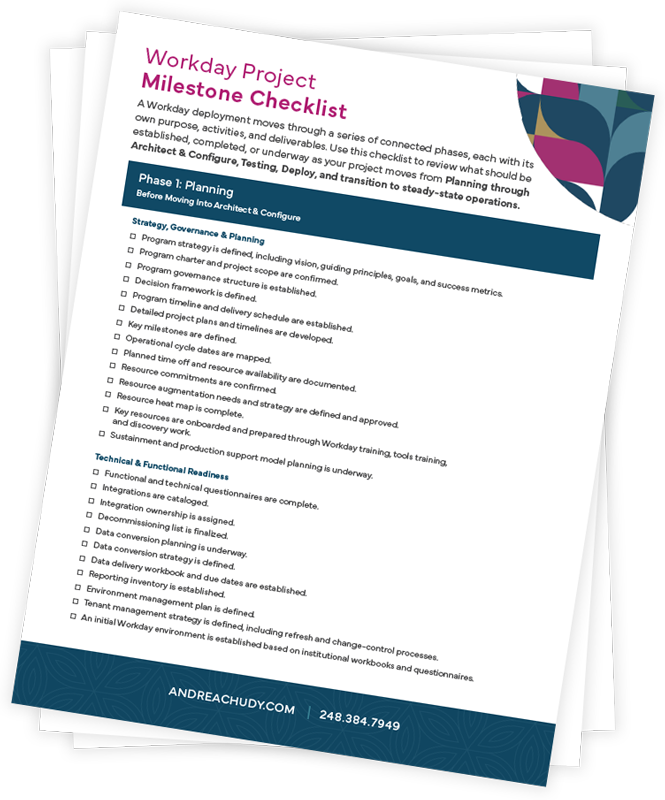
Use the Workday Project Roadmap Checklist to review the foundation before entering Architect & Configure.
Download the ChecklistPhase 2: Architect & Configure
Turn the plan into a system that can actually be tested.
Architect & Configure is where decisions become system reality. Business processes are finalized. Configuration is built. Security is defined. Integrations and reports are developed. Data is converted and validated. Test scenarios become more detailed.
But this phase is about more than building. It is also where the institution needs to begin developing real ownership of the system. The internal team should understand not only what is being configured, but why decisions were made and how those decisions affect future operations.
What should be happening during Architect & Configure?
Finalize design decisions
Major business process and configuration decisions should be confirmed across the project. Cross-functional dependencies also need to be surfaced and resolved. Decisions made in one area can affect security, reporting, integrations, downstream processes, and other workstreams. Those decisions should be documented rather than left in meeting notes or individual team members’ memories.
Configure the solution
Functional configuration should progress across the in-scope areas. At the same time, teams should be developing security roles, integrations, reports, and the environments required for testing. The goal is not simply to complete configuration tasks. The goal is to create a solution that works together across the full program.
Work through the data
Data conversion should happen iteratively. Each cycle provides another opportunity to identify gaps, correct data issues, improve mapping, and validate whether converted information is accurate and usable. Waiting until the final conversion to discover data problems creates unnecessary risk.
We consistently sees three areas where implementations are most likely to struggle: data conversion, integrations, and payroll. Issues in any of these areas can have significant downstream impact, making them critical areas of focus throughout configuration and testing preparation.
Prepare for future state
Standard Operating Procedures (SOPs) should also come out of this phase. By documenting the future-state processes being designed and configured, SOPs can become the foundation for testing scenarios in the next phase. This allows project artifacts to serve more than one purpose instead of being created once and set aside.
Prepare for formal testing
Test scenarios should increasingly reflect real business processes. Teams should be developing unit scenarios, end-to-end scenarios, and user readiness scenarios while establishing how defects will be documented, prioritized, resolved, and retested. Testing should not begin with a blank page.
Build knowledge and ownership
Knowledge transfer should happen throughout configuration, not only at the end of the project. Internal teams need exposure to the configuration, decisions, dependencies, and support requirements they will eventually own. Training needs, change impacts, and the post-go-live support model should also become clearer during this phase.
What should be taking shape?
Before formal testing begins, you should expect to have:
- Documented functional design decisions
- Standard Operating Procedures (SOPs) documenting future-state processes
- Defined security roles and access requirements
- Integration designs
- Reporting designs
- Configured and validated test environments
- Multiple data conversion iterations
- Unit test scenarios
- End-to-end test scenarios
- User readiness scenarios
- Testing schedules
- Training approach
- Updated readiness information
- Defined sustainment and post-go-live support model
Questions leaders should be asking
- Are important design decisions documented and understood?
- Are cross-functional dependencies being resolved before testing?
- Is the internal team actively participating in configuration decisions?
- Are data conversion cycles revealing and resolving issues?
- Are we developing realistic test scenarios based on how the organization actually operates?
- Do we understand how security, integrations, reporting, and configuration affect one another?
- Is knowledge staying with the institution, or primarily with the deployment team?
Before moving forward
Architect & Configure should end with a solution that is more than configured. It should be documented, validated, test-ready, and understood well enough for the institution to participate meaningfully in formal testing.
Before testing starts,
find the gaps while there is still time to address them.
Download the Workday Project Roadmap Checklist Phase 3: Testing
Testing is not just about whether the system works.
One of the biggest mistakes a project can make is treating testing as a technical exercise. The real question is bigger: Can the organization successfully operate using what has been built?
Testing validates how configuration, data, business processes, security, reports, integrations, systems, and people work together. That means testing real scenarios, realistic handoffs, operational cycles, and the connections between different parts of the institution.
What should be happening during Testing?
Validate end-to-end processes
Teams should execute realistic business scenarios from beginning to end. That includes confirming not only that individual steps work, but that handoffs between people, roles, systems, and workstreams happen correctly.
Execute structured testing cycles
Depending on the deployment, this may include:
- Unit testing
- Lifecycle testing
- End-to-end testing
- Regression testing
- Parallel testing
- User readiness testing
Each testing cycle should have a clear purpose and defined criteria for determining whether the project is ready to progress.
Validate data, integrations, security, and reporting
Testing should confirm that converted data is accurate and usable. Integrations should execute correctly and support downstream processes. Reports should produce reliable information. Security roles and access should function as intended. Testing one area successfully does not mean the entire ecosystem is ready.
Manage defects intentionally
Issues will be found. That is part of the process. What matters is how they are managed. Defects should be documented, prioritized, assigned, resolved, and retested through a structured process. The goal should not be to reach zero issues at any cost. The goal is to understand what remains, the risk it creates, and whether the organization can responsibly move forward.
Use testing to inform readiness
Testing results should influence more than the technology. They should inform training materials, change communications, readiness assessments, support planning, cutover preparation, and the final decision about whether deployment should proceed.
What should be taking shape?
Before entering Deploy, you should expect to have:
- Defined testing governance
- Clear testing entry and exit criteria
- Completed required testing scenarios
- Documented testing results
- Defect tracking and resolution status
- Validated data conversion
- Successfully tested integrations
- Validated reports
- Confirmed security and access
- Parallel testing results where required
- Updated training materials
- Updated readiness assessment
- Refined cutover plan
- Confirmed hypercare and support readiness
- Formal approval to proceed
Questions leaders should be asking
- Are we testing realistic business scenarios or isolated system functions?
- Are the right users participating in testing?
- Are data accuracy and usability being validated alongside system functionality?
- Are integrations and reports being tested under realistic conditions?
- Are defects being prioritized based on business and operational risk?
- Are resolved defects being retested?
- Are testing outcomes changing our training, communication, and deployment plans where needed?
- If we went live tomorrow, what would still concern us?
That final question is often one of the most valuable questions a project team can ask.
Before moving forward
Testing is complete when the organization has enough evidence to confidently determine that the system, processes, data, users, and support structure are ready for deployment.
Passing test scripts is only part of that decision.
Think you're ready for go-live?
Make sure the evidence supports it.
Download the Workday Project Roadmap Checklist Phase 4: Deploy
Deployment is not a single event. It is a coordinated sequence of technical, operational, and organizational actions.
Deploy is where the project moves from testing into live operations. Final configuration and data are moved into production. Cutover activities are executed. Users begin working in the new environment. Support processes are activated. Early production activity is monitored closely.
Successful deployment depends on coordination across technical, functional, operational, and organizational teams. It is not simply the moment the system is turned on.
What should be happening during Deploy?
Execute cutover
Final configuration and approved data should move into production according to a detailed cutover plan. Activities should have clear owners, timing, dependencies, and escalation paths. Final data conversion and any required catch-up transactions should also be completed and validated.
Confirm production readiness
Once the system is live, critical processes need to be verified in the production environment. Teams should confirm:
- Security and access
- Critical business processes
- Integrations
- Scheduled jobs
- Reporting
- Final data
- Key transactions
The goal is to quickly identify anything that could affect day-one operations.
Stabilize the system
Early production activity should be monitored carefully. Issues need to be logged, prioritized, resolved, and retested through a defined hypercare process. This period helps reduce operational risk while the system begins handling real transactions and real users at scale.
Support users
Final training, job aids, and quick reference materials should be available. Users should understand how to get help and where issues should be escalated. A successful launch requires support for the people using the system, not just the technology running behind it.
Transition ownership
The project team should begin moving toward the long-term operating model. Sustainment processes, support ownership, governance, and escalation paths should already be established so the institution can begin assuming ongoing responsibility.
What should be in place?
During deployment, you should expect to see:
- Live production environments
- Completed final data conversion
- Executed cutover plan
- Validated production processes
- Confirmed security and access
- Operating integrations and scheduled jobs
- Accurate reporting
- Active hypercare process
- Final end-user training materials
- Operational readiness confirmation
- Formal acceptance of phase deliverables
Questions leaders should be asking
- Does every critical cutover activity have a clear owner?
- Has final production data been validated?
- Can users access what they need?
- Are integrations and scheduled jobs operating correctly?
- Are critical business processes working in production?
- Do users know where to go when they need help?
- Are issues being prioritized and resolved quickly enough?
- Is the institution ready to own the system once deployment support begins stepping away?
Before moving into steady state
Deployment is successful when the system is live, critical operations are stable, users are supported, and the organization is prepared to take ongoing ownership.
Go-Live Isn’t the Finish Line
Going live is an important milestone but it’s not the end of the work. After deployment comes stabilization and the transition into steady-state operations. This is when the organization begins moving away from implementation mode and into a sustainable operating model.
The focus shifts toward:
- Stabilizing recurring operations
- Resolving remaining production issues
- Establishing long-term governance
- Supporting users
- Maintaining internal knowledge
- Refining processes
- Managing future enhancements and changes
The decisions made earlier in the project have a direct impact here. If ownership, knowledge transfer, support processes, and governance were treated as future concerns, the transition can be difficult.
If they were built into the deployment from the beginning, the organization is in a much stronger position to sustain what it has created.